ChatGPT Business Hub: How to Claim Your Business and Improve Your AI Search Visibility in 2026
Imagine a potential customer asking ChatGPT, “Which digital marketing agency should I choose in Pune?” or “Where can I find a reliable manufacturer for this product?”
Instead of browsing multiple websites, the customer receives recommendations, compares businesses and explores available products or services directly through an AI-powered conversation.
Now imagine your business being part of that discovery process.
This is the opportunity emerging with ChatGPT Business Hub, OpenAI’s new initiative that allows eligible businesses to manage their information, understand how they appear in ChatGPT and create new ways to connect with potential customers.
As AI-powered search changes how people discover brands, businesses need to think beyond traditional search engine rankings. Maintaining accurate business information, creating useful website content and building a trustworthy online presence are becoming increasingly important.
For businesses looking to strengthen their digital presence, this development also creates new opportunities to explore Search Engine Optimization (SEO), Answer Engine Optimization (AEO) and Generative Engine Optimization (GEO).
In this guide, PJP Digital explains what ChatGPT Business Hub is, how businesses can claim their profiles, what features are available and how companies can prepare their digital presence for the growing AI discovery ecosystem.
1. What Is ChatGPT Business Hub?
ChatGPT Business Hub is an OpenAI dashboard that allows business owners and authorized representatives to claim and manage their business presence within ChatGPT.
Announced in beta on November 10, 2026, as part of OpenAI’s Businesses in ChatGPT initiative, it introduces new ways for businesses to share information and understand how users interact with them through ChatGPT.
Through Business Hub, eligible businesses can:
- Claim their business profile.
- Update business information.
- Add business descriptions and contact details.
- Upload logos and cover images.
- Share product information through product feeds.
- View aggregated business engagement insights.
- Explore Business Agent capabilities, where eligible.
The purpose is to help businesses provide accurate and updated information that ChatGPT can use when answering relevant customer questions.
For example, if someone asks ChatGPT about a particular product category, the platform may use available business information to help explain relevant offerings.
However, claiming a business does not guarantee that ChatGPT will recommend it or improve its position in AI-generated answers.
2. ChatGPT Business Hub vs. ChatGPT Business: What Is the Difference?
These two terms sound similar but represent different OpenAI offerings.
| Feature | ChatGPT Business Hub | ChatGPT Business |
| Main purpose | Manage business presence in ChatGPT | Provide an AI workspace for employees |
| Intended users | Business owners and authorized representatives | Organizations and teams |
| Business profile management | Yes | Not its primary purpose |
| Product information | Product feed capabilities | Not its primary purpose |
| Business Insights | Aggregated visibility and engagement data | Not a Business Hub insights feature |
| Business Agents | Available to eligible businesses | Separate product concept |
| Primary objective | Business discovery and customer engagement | Employee productivity and collaboration |
In simple terms, ChatGPT Business Hub helps businesses manage how they appear to customers within ChatGPT, while ChatGPT Business is a workspace designed for employees using ChatGPT at work.
3. What Are the Key Features of ChatGPT Business Hub?
Business Hub introduces several features designed to help organizations manage their business information and customer engagement.
A. Business Profile Management
Businesses can claim their profiles and manage important information that may appear in ChatGPT.
This includes:
- Business name and category.
- Business description.
- Website address.
- Contact information.
- Business logo.
- Cover image.
- Delivery policies.
- Return policies.
Why does this matter?
Customers need reliable information before making purchasing decisions.
If your business information is incomplete or outdated, customers may not receive the information they need when exploring your company.
Maintaining accurate business details is therefore an important starting point.
B. Verified Business Profile
After completing the required verification process, eligible businesses can receive a blue verified badge.
It is important to understand the difference between claiming a business profile and completing identity verification.
Claiming your business gives you access to its profile in Business Hub. After successful identity verification through Persona, eligible businesses can receive a blue verified badge and access additional management features.
The badge helps customers identify that the business has completed OpenAI’s applicable verification requirements.
Businesses must be able to demonstrate that they own or are authorized to represent the organization.
Verification may involve business phone, email, website domain or Shopify-based methods, depending on what is offered for the listing.
Identity verification through Persona is also required before businesses can publish updates and access certain Business Hub features.
C. Product Feeds
For eligible retailers, product feeds provide a way to share product information with ChatGPT.
A product feed can include:
- Product names.
- Product descriptions.
- Product images.
- Pricing information.
- Product availability.
- Relevant product attributes.
Businesses can use supported feed submission methods, including CSV files, hosted feeds and eligible Shopify connections.
For example, an online electronics store could provide updated information about its available laptops, specifications and prices.
When customers ask relevant product questions, ChatGPT may use this information to help them explore available offerings.
However, submitting a product feed does not guarantee product recommendations or placement.
D. Business Insights
Business Hub also introduces aggregated insights that help businesses understand how they appear in ChatGPT.
The reported metrics include:
- Mentions: How often the business is referenced according to OpenAI’s applicable reporting definitions.
- Website Clicks: Recorded clicks on links directing users to the business website.
- Discovery Topics: Common themes associated with ChatGPT responses in which the business website is cited.
These insights can help companies understand their presence within ChatGPT.
An important limitation is that businesses do not receive individual customer conversations or prompts. Reporting is aggregated and subject to minimum activity thresholds.
E. Business Agents
Business Agents introduce another way for eligible companies to interact with potential customers.
A Business Agent is a clearly labelled conversational experience that can answer questions about a business using the information supplied by that business.
For example, an ecommerce customer might ask:
- What is the difference between these two products?
- Which product is suitable for my requirements?
- What is your return policy?
- What are the available product options?
The Business Agent can help customers explore these questions using the business’s approved information and instructions.
Business Agents are currently available to eligible ecommerce and online service businesses in the United States. Availability is subject to OpenAI’s eligibility requirements.
This is a developing feature and businesses in India should check the latest availability before planning implementation around it.
4. How to Claim Your Business on ChatGPT Business Hub
Claiming your business is the first step towards managing its presence through Business Hub.
Here is the general process.
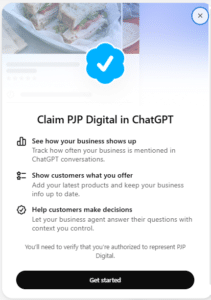
Step 1: Open ChatGPT Business Hub
Visit:
https://chatgpt.com/business-hub
Sign in to your ChatGPT account and look for the Business Hub option.
Step 2: Search for Your Business
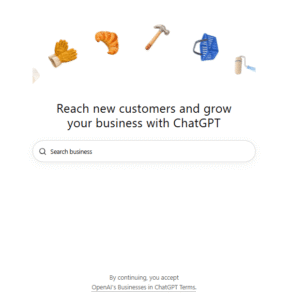
Search using your business name and identify the correct listing.
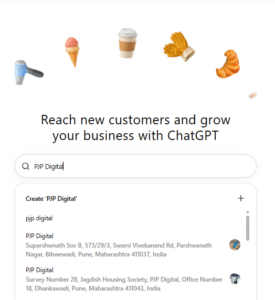
Select the matching business profile and confirm that you are using an account controlled by your business or an authorized representative.
If no matching listing appears, check whether Business Hub offers an option to add your business. This option may depend on the business’s eligibility and the functionality available for your listing.
Step 3: Verify Your Business Ownership
Depending on the available options, OpenAI may offer verification through:
- Business phone number.
- Business email address.
- Website domain verification.
- Shopify store connection.
The verification options depend on the business and listing.
Step 4: Complete Identity Verification
After the business claim is approved, complete the required identity verification through Persona.
You may need:
- Government-issued identification.
- Business registration information.
- Proof that you are authorized to represent the company.
Step 5: Update Business Information
Once verification is approved, access the profile editor.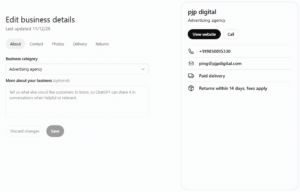
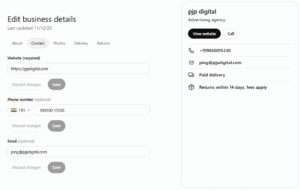
Review the following details:
- Business description.
- Business category.
- Website.
- Contact information.
- Logo and cover image.
Ensure the information matches your official website and business documentation.
Step 6: Connect Product Information
If your company sells products and the relevant functionality is available, explore connecting an approved product feed.
Step 7: Monitor Business Insights
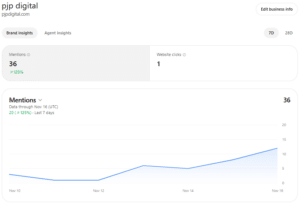
Once reporting becomes available, review your mentions, website clicks and discovery topics.
Use the information to identify opportunities for improving your website content and business information.
Important: OpenAI’s approval and verification requirements apply. Completing the steps does not guarantee that every business will be eligible for every feature.
5. Can Indian Businesses Claim Their Business on ChatGPT?
This is an important question for Indian business owners.
OpenAI’s announcement states that eligible businesses in locations where ChatGPT is available can claim their business through Business Hub.
However, eligibility depends on business location, industry, verification and other integrity requirements.
This means Indian businesses should check whether their business listing and verification options are supported before assuming they can complete the process.
There is also an important distinction concerning Business Agents.
Therefore, Indian companies can prepare their business information and digital presence, but should not assume that Business Agent functionality is available to them.
6. Frequently Asked Questions About ChatGPT Business Hub
1. What is ChatGPT Business Hub?
ChatGPT Business Hub is an OpenAI dashboard that allows eligible business owners and authorized representatives to claim and manage their business information in ChatGPT, connect product feeds where supported and access aggregated engagement insights.
2. Is ChatGPT Business Hub free?
OpenAI’s launch information does not list a separate fee for claiming and managing an eligible business profile or accessing its Insights. However, businesses should review the Businesses in ChatGPT terms and any applicable costs for other services, advertising or external integrations.
3. How do I claim my business on ChatGPT?
Visit chatgpt.com/business-hub, sign in, search for your business, select the matching listing and complete the available business verification process. After claim approval, complete Persona identity verification to access additional management features.
Conclusion: Prepare Your Business for the Future of AI-Powered Search
The way customers discover and evaluate businesses is evolving.
With the introduction of ChatGPT Business Hub, eligible businesses have a new opportunity to manage their information and understand how they appear within AI-powered conversations.
However, claiming a business profile is only one part of a broader digital visibility strategy.
Your website, content quality, search optimization, business information and online reputation continue to play important roles in helping customers understand and evaluate your brand.
Businesses that invest in accurate information and a strong digital foundation will be better prepared to adapt as AI-powered discovery develops.
Is your business ready for AI-powered search?
Partner with PJP Digital to strengthen your online visibility through SEO, AEO, GEO and customized digital marketing strategies.
Let’s discuss your business requirements and explore how PJP Digital can help you grow.
Call: +91 9850015330 | Email: ping@pjpdigital.com
PJP Digital – Your Business Growth Partner in the Digital World.